


Hue Light App Remote Control
4.2637.00 Reviews
App Specs
- Version
- 7.4.5
- Updated On
- License
- Free
- Downloads
- 1,000,000+
- Developer
- Metaverse Labs
- Categories
- House & Home
- Platform
- Android
Screenshots
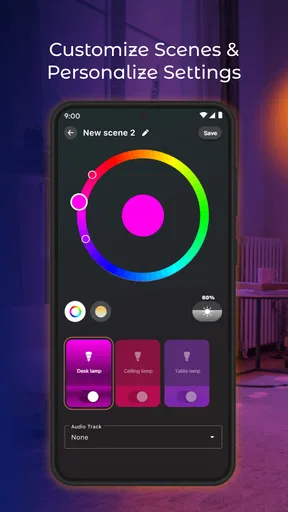
 Analysis by AppCompare
I find Hue lighting most interesting when it solves a small, repeated household annoyance: changing the room’s feel without crossing it to reach a switch. Hue Light App Remote Control is a free House & Home app from Metaverse Labs, built around controlling Hue smart lights and shaping scenes, widgets, and sound-linked effects. The useful question is not whether a phone can turn a bulb on; it is whether a separate control app makes everyday lighting easier to manage. For people who already use Hue lights, that is where this app is worth a closer look.
Why control from your phone can matter
A dedicated light-control app is most helpful when the same room needs different lighting at different times. A bright setting may work while you are cooking, while a softer scene feels better when you sit down to eat. Using a phone means you can make that change from where you are instead of treating every light as a simple on-off switch. I would think of this app less as a replacement for the physical switch and more as another way to make Hue lighting fit a routine.
That distinction matters if you are comparing it with the usual alternatives. A bulb’s wall switch is immediate and uncomplicated, but it cannot offer the same kind of in-app scene selection. A general smart-home app may be the more convenient choice if you already control several kinds of devices in one place. A Hue-focused control app makes more sense when your main goal is adjusting Hue lights, rather than building a broad dashboard for the whole home.
Scenes, widgets, and sound in everyday use
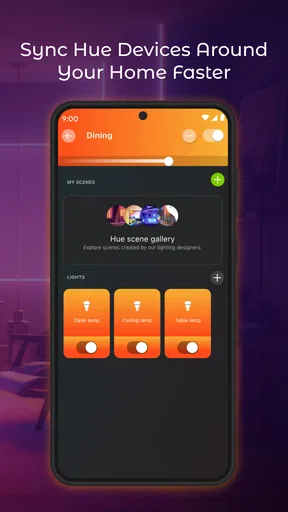
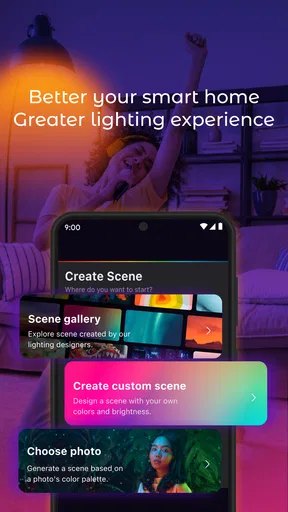
The app’s emphasis on personalizing scenes, adding a widget, and syncing light with sound points to three different ways of using it. Scenes let you save a particular look instead of rebuilding it each time. A widget can bring a light control closer to the phone’s home screen, which may save a few taps for a setting you use often. Sound sync is a more expressive option: it is aimed at making light respond to audio, rather than serving as a practical tool for ordinary room illumination.
One useful habit is to keep scene choices tied to activities rather than making a long collection of similar-looking presets. For example, I would start with a few clear purposes—comfortable evening light, brighter task lighting, and a setting for relaxing—then see which ones I actually reach for. That makes a personalized setup easier to use when I am tired or in a hurry. A widget is most valuable when it points to a frequently used control; placing a rarely used option there adds clutter without making lighting simpler.
A realistic routine and a sensible setup
Picture arriving home with groceries in both hands. If the kitchen is already lit the way you like, there is no need to stop and adjust several bulbs one by one. Later, when you move to the living room, a different scene can make the space feel more comfortable. The benefit is not a dramatic change in how a home works; it is the small convenience of matching light to what you are doing without interrupting it.
Before relying on the app as your only way to control a room, I would check that the Hue lights you want to use are available in the app and that your preferred controls behave as expected. Keep a physical switch accessible, too. Phone control is handy, but it depends on having your phone nearby and the lights remaining powered. This is a practical backup, not a criticism unique to this app: smart bulbs cannot respond through software if someone has switched off their power at the wall.
Worth Reading Before You Choose

EA SPORTS FC Mobile 26 Is a Bigger Football Game, but It Takes Time

Flipboard Shows What News Apps Must Do Beyond the Feed

Switching to Android Auto Means Rethinking Your Driving Routine

Google Calendar Makes a Crowded Week Easier to Manage

Ludo King Makes the Most of the Minutes Between Plans

Baby Panda World Brings Quick Play to Modern Phones, but Its Game Library Feels Busy
Getting Started: A Breeze in the World of Smart Lighting
First things first, setting up the Hue Light App Remote Control is as smooth as butter. Once you’ve got your Philips Hue bulbs installed, it’s just a matter of downloading the app from your app store, whether you’re rocking Android or iOS. A quick sign-up and a few taps later, the app is ready to light up your world, literally!
What I absolutely love is how intuitive the interface is. You don't need a tech degree to figure things out. The app walks you through everything, making it super user-friendly. Plus, it connects effortlessly with your Wi-Fi, ensuring that you have seamless control over your lighting setup.
Features That Make Your Home Shine
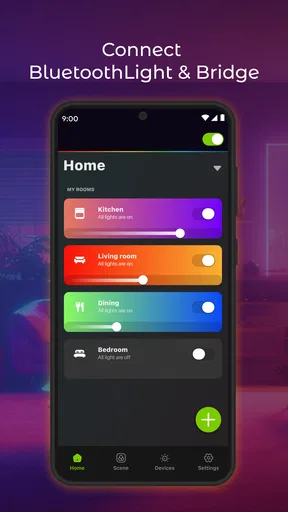
Now, let’s talk about the features that make this app a standout. With the Hue Light App Remote Control, you can manage your lights individually or group them by rooms. This means you can dim the bedroom lights while keeping the kitchen bright as day—all from your phone.
Feeling a bit fancy? The app lets you play with colors like an artist with a palette. Choose from millions of hues to set the perfect mood, whether it’s for a party or a quiet night in. And if you’re a fan of automation, the scheduling feature is a game-changer. Set your lights to wake you up in the morning or gradually dim as you wind down for the night.
For the tech-savvy or those who dabble in smart home ecosystems, this app syncs beautifully with voice assistants like Alexa, Google Assistant, and even Apple’s Siri. Just a simple voice command, and voila! Your lights obey.
Performance: Smooth and Reliable
In terms of performance, the app is pretty reliable. The connection between the app and the bulbs is swift, with little to no lag. It’s incredibly responsive, making the whole experience feel premium. The developers did a fantastic job ensuring that the app runs smoothly, minimizing any potential hiccups.
Even when testing the app during peak hours, when everyone’s home Wi-Fi tends to get a bit crowded, the app held its ground. This means you won't be left in the dark—literally and figuratively.
Design and Usability: Easy on the Eyes
The app’s design is sleek and modern. The clean layout and intuitive controls make navigating through different options a breeze. It’s clear that a lot of thought went into making the user interface aesthetically pleasing and functional.
With its minimalist design, the app avoids overwhelming users with too many options upfront. Instead, it presents everything in a clear, organized manner, allowing you to find what you need quickly without any fuss.
Conclusion: A Bright Idea for Your Smart Home
All in all, the Hue Light App Remote Control is a must-have for anyone looking to dive into the world of smart lighting. With its easy setup, robust features, and reliable performance, it’s an app that delivers on its promises. Whether you’re a tech enthusiast or just someone who enjoys the convenience of modern living, this app is sure to brighten up your day—quite literally.
If you haven’t yet ventured into smart home territory, this app offers a compelling reason to start. So go ahead, download it, and let your lighting reflect your lifestyle.
Compatibility, cost, and who should consider it
The app is rated for Everyone, and its current version is 7.3, with Android 6.0 as the minimum operating-system requirement. It has a 4.2 average from around 30,000 ratings, and more than a million installs. I see those figures as useful context, not a guarantee that every household will have the same experience: your results still depend on having Hue lights and a setup that works for your home.
It is free to install, with in-app purchases ranging from $2.99 to $24.99 per item. I would begin with the free experience and decide whether the controls you actually use justify spending anything. If you only need a light to switch on and off, paying for extras may not improve your routine. If you enjoy experimenting with scenes or want a more personal way to manage lighting, optional purchases may be more relevant—but I would treat them as a choice, not a prerequisite.
This is a better fit for someone who already owns Hue bulbs and wants a phone-centered way to adjust them. It is less compelling if you are still choosing a smart-light ecosystem, have no Hue lights, or prefer keeping all smart-home controls in one established app. In those cases, compare the cost and convenience of the whole lighting setup first; installing a controller alone cannot make ordinary bulbs smart.
Where the convenience has limits
One trade-off with phone-based control is that it adds a step compared with a nearby switch: you need to reach for your phone, open or access the control, and choose what you want. A widget can reduce that friction, but it is only useful if it stays easy to find and shows the controls you care about. I would avoid putting every possible scene in front of myself; a short, purposeful set is easier to use than a crowded menu.
Sound-linked lighting is also best judged by the room and occasion. It can make sense when you want a more atmospheric setup for music, but it is not automatically an improvement for reading, cooking, or winding down. For those tasks, dependable brightness and a familiar scene are more useful than effects. I would try sound sync as an optional change of pace, not make it the default behavior for a room used for everything.
Likewise, a scene that looks appealing on a phone may not suit every person sharing the space. If several people use the same room, agree on a few practical settings and keep the everyday controls obvious. That simple bit of planning can prevent a personalized setup from becoming something only one person knows how to operate.
My take for a Hue household
Metaverse Labs’ app is worth considering if you want a more tailored way to control Hue lighting and are willing to spend a little time arranging the controls around your habits. Its strongest idea is the everyday link between a saved lighting choice and the moment you need it: a quick scene for a familiar room, a convenient widget for a repeated action, or sound-responsive light when atmosphere matters more than utility.
I would skip it if you want a universal smart-home hub, do not use Hue lights, or expect phone control to remove every practical limitation of smart bulbs. For everyone else, the sensible approach is to start with one room, create only a few useful scenes, and see whether the app genuinely saves effort. If those controls become part of your routine, it earns its place; if they do not, the simplest option is to return to the control method you already use.
Pros
- User-friendly interface for easy navigation.
- Wide range of lighting customization options.
- Seamless integration with smart home devices.
- Efficient voice command support.
- Reliable remote access from anywhere.
Cons
- Limited features in the free version.
- Setup can be complex for beginners.
- Occasional connectivity issues.
- Requires stable Wi-Fi for optimal performance.
- Some features need in-app purchases.
FAQs for Hue Light App Remote Control
What is the Hue Light App Remote Control used for?
The Hue Light App Remote Control is designed to manage and customize your Philips Hue smart lighting system. It allows users to control lighting settings, create schedules, and set ambiance with different colors and intensities, all from their smartphone. This app offers convenience and personalization for your home lighting needs.
Is the Hue Light App compatible with all Philips Hue devices?
Yes, the Hue Light App is compatible with all Philips Hue devices, including bulbs, light strips, and other smart lighting products. However, ensure your devices are updated with the latest firmware for optimal performance. Always check for compatibility if you have older models before downloading the app.
Do I need a Philips Hue Bridge to use the Hue Light App?
Yes, a Philips Hue Bridge is required to fully utilize the Hue Light App’s features. The Bridge acts as a central hub, connecting your smart lights to your home network. Without the Bridge, you may not be able to access the full range of controls and functionalities that the app offers.
Can I control my lights remotely with the Hue Light App?
Yes, the Hue Light App allows users to control their lights remotely as long as they have an internet connection. This feature is particularly useful for those who want to manage their home lighting system while away, ensuring security and energy efficiency from anywhere in the world.
Does the Hue Light App support voice control options?
Absolutely, the Hue Light App is compatible with various voice assistants, including Amazon Alexa, Google Assistant, and Apple HomeKit. This integration allows users to control their lighting with voice commands, adding an extra layer of convenience and accessibility to their smart home setup.


